
A creator desk does not need more gadgets; it needs fewer reasons to break concentration. The useful upgrades are the ones that remove a repeatable interruption: looking away from the camera while presenting, hunting through menus for the same editing control, or sealing yourself off from the room just to hear a call.
This guide compares three products in the Anagramshop catalog: Elgato Prompter, Logitech MX Creative Console and Shokz OpenFit 2. They are not a starter kit. Each earns its place only if it addresses a friction you hit several times a week.
Choose the bottleneck before the accessory
| Repeated desk problem | Relevant tool | Published detail | What it does not solve |
|---|---|---|---|
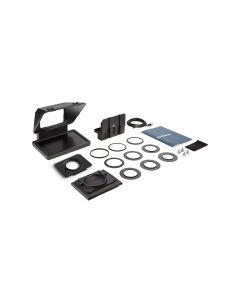
| You read notes or watch participants away from the lens | Elgato Prompter | Built-in 9-inch, 1024 × 600 display; USB-C; nine step-up rings from 49–82 mm | Camera framing, presentation preparation or an incompatible computer/camera setup |
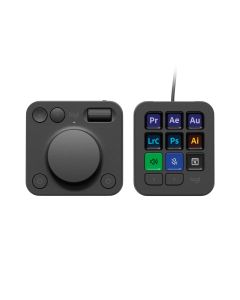
| You repeat the same editing, design or meeting actions | MX Creative Console | Programmable keypad plus analog dialpad, app profiles and plugin support through Logi Options+ | Learning an editor, deciding which shortcuts matter or doing creative work automatically |
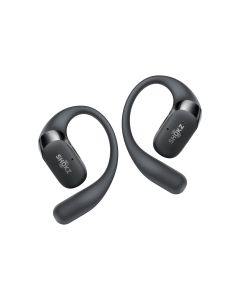
| You need calls and background audio without feeling isolated | Shokz OpenFit 2 | Open-ear format intended to leave the ear canal unobstructed | Quiet monitoring in a loud room, hearing protection or a substitute for a good microphone |
Elgato Prompter: fix the eye-contact workflow, not every video problem
The Elgato Prompter is for a very visible form of desk friction: the person on camera keeps looking at a script, slides or meeting participants instead of toward the lens. Elgato’s Prompter has a built-in 9-inch, 1024 × 600 display, connects by USB-C, and can display text, apps and windows. It ships with step-up rings covering 49 to 82 mm lenses, backplates and a universal bracket, so it is more flexible than a tablet teleprompter—but it is still a physical camera setup.
It makes sense for recorded lessons, client presentations, live streams and frequent remote calls where camera presence changes the outcome. The real check is compatibility: confirm the camera, lens, mounting position, computer connection and desk clearance before buying. Voice Sync is also not universal; Elgato specifies an RTX 2060-or-newer GPU or Apple Silicon for that feature. Prompter does not make a weak script, poor lighting or an unprepared presentation better. It simply puts the information you need closer to the lens.
Logitech MX Creative Console: reduce repeated controls, then keep the useful ones
The Logitech MX Creative Console has a different job: turning frequent on-screen actions into tactile ones. Logitech pairs a programmable keypad with an analog dialpad; the contextual dial changes behavior with the selected action, while the companion Logi Options+ app provides profiles and plugins for apps such as Photoshop, Premiere Pro, Lightroom, Final Cut Pro, DaVinci Resolve, Figma, Zoom and Teams.
This is useful for a creator or hybrid worker who repeats the same trims, zooms, brush adjustments, scene changes or meeting controls every day. It is less useful for someone who changes software constantly, works mainly in a browser, or has not yet identified three actions worth mapping. Start with one application and five recurring actions. If the console eliminates those detours for a week, add another profile; if it becomes decoration next to the keyboard, the mouse and shortcut keys were already enough.
Shokz OpenFit 2: ambient awareness is the feature and the trade-off
The Shokz OpenFit 2 is the lightest-touch upgrade of the three. Its open-ear design is meant for calls, edit checks and movement around a home office when it helps to hear a delivery, colleague or family member without removing an earbud. That can make a desk routine feel less sealed-off than conventional in-ear headphones.
The limit matters just as much: open-ear audio is not a solution for a noisy café, loud shared office, detailed audio mixing or situations that need isolation. It should not be used to compensate for poor call audio; a well-positioned microphone, quiet room and clear meeting habits matter more. Confirm fit, current microphone behavior, multipoint support and the exact water-resistance rating on the current model listing.
A small setup order that avoids expensive clutter
- Fix light, webcam position and microphone first; no controller or teleprompter replaces a basic, intelligible call setup.
- Track one week of work and write down the action that repeatedly interrupts your attention.
- Choose Prompter only if eye-line is the problem, the Console only if the same software action repeats, and OpenFit only if ambient awareness improves the day.
- Check compatibility and desk space before ordering, then keep the setup simple enough to use without a pre-flight checklist.
What not to buy yet
- Do not buy a teleprompter before you have confirmed camera/lens support and a stable mounting plan.
- Do not buy a control console before identifying the shortcuts that truly recur.
- Do not buy open-ear headphones for a space where you need isolation or precise audio monitoring.
- Do not add all three at once; change one bottleneck, then see what remains.
Questions buyers ask
Can Elgato Prompter work for ordinary video calls?
Yes, when the computer, webcam or camera can be mounted and connected correctly. It is most valuable when you regularly need to look at participants or notes while appearing to look into the lens.
Will MX Creative Console make me faster immediately?
Only after setup. Its value comes from mapping actions you already repeat; it cannot decide your editing workflow or make unfamiliar software intuitive.
Are open-ear headphones better for calls?
They are better only if environmental awareness helps. They trade isolation for awareness, so a noisy environment may require a different audio solution.
What is the best first desk upgrade?
Usually the one that removes a daily interruption. Measure frequency, not visual appeal: eye contact, repeated software controls and ambient audio are three very different needs.
Sources and product details checked
- Elgato Prompter official product details
- Elgato camera compatibility guidance
- Logitech MX Creative Console official product details
- Shokz OpenFit 2 official product details
As an Amazon Associate we earn from qualifying purchases.
Comments