Short answer: the fastest way to improve a desk is not buying one expensive gadget. It is removing the friction you see every day: cables hanging behind the monitor, chargers stealing outlet space, laptop height too low, small accessories scattered around, and a power setup that changes every time you unplug something.
This guide compares desk products already in the Anagramshop catalog: No-Drill Under-Desk Cable Tray, Under-Desk Cable Organizer Set, Desk Clamp Power Strip, Adjustable Metal Monitor Stand, Compact Laptop Stand, Satechi Thunderbolt 5 CubeDock, Anker Prime Charger 100W and Logitech Pebble Mouse 2.
Fix the desk by layer
| Desk problem | Product to compare | Why it helps | Check before buying |
|---|---|---|---|
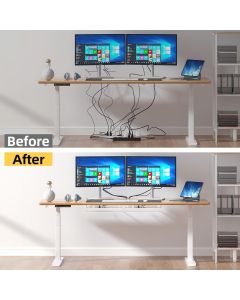
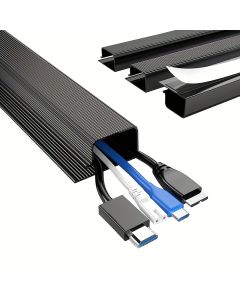
| Cables hang visibly behind or under the desk | No-drill cable tray | Moves the cable mess off the floor without drilling into the desk. | Desk thickness, adhesive/clamp style, tray length and loaded weight. |
| Small chargers and cords keep sliding around | Under-desk organizer set | Useful for routing lighter cables and keeping recurring plugs predictable. | Mounting method, number of clips, surface material and cable diameter. |
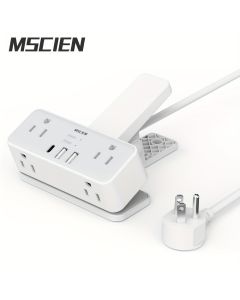
| Power strip sits on the floor | Desk clamp power strip | Brings charging access to the desktop edge. | Outlet type, surge claims, clamp clearance, plug orientation and safety certifications. |
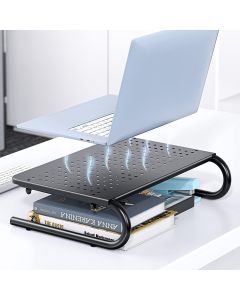
| Monitor sits too low | Adjustable metal monitor stand | Raises the screen and creates storage space underneath. | Monitor weight, width, height range, stability and keyboard clearance. |
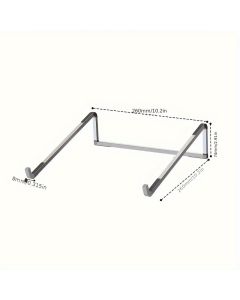
| Laptop posture is poor | Compact laptop stand | Separates screen height from keyboard position for a cleaner setup. | Laptop size, angle, wobble, ventilation and whether an external keyboard is needed. |
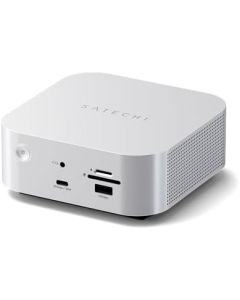
| Creator or laptop desk needs one hub | Satechi Thunderbolt 5 CubeDock | Combines high-speed desk connectivity with storage expansion potential. | Computer Thunderbolt support, monitor needs, SSD compatibility and heat. |
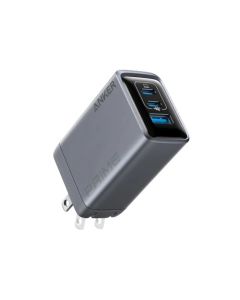
| Too many separate wall chargers | Anker Prime Charger 100W | One serious charger can simplify phone, tablet and laptop charging. | Port sharing, cable quality, device wattage and plug region. |
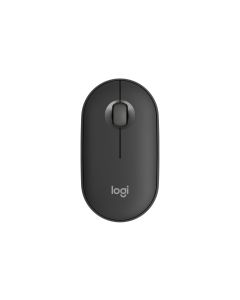
| Mouse takes space or travels badly | Logitech Pebble Mouse 2 | A slim mouse keeps the setup simple and portable. | Hand size, Bluetooth compatibility, battery and whether silent clicks matter. |
Start under the desk, not on top of it
The No-Drill Under-Desk Cable Tray is the first product I would compare because cable mess usually starts below the work surface. If the power strip, monitor brick and extra cable length are on the floor, every desktop accessory still looks messy.
The key caveat is mounting. Adhesive can be fine for lighter routing, but weight, heat and desk material matter. Clamp systems are easier to remove but need enough clearance. Before buying, look at the underside of the actual desk and check whether drawers, support bars or sit-stand mechanisms block the tray.
Then make power reachable
A Desk Clamp Power Strip can be genuinely useful when the outlet is always behind furniture or under the desk. It is not a magic safety upgrade. It is a convenience layer: fewer crawling-under-the-desk moments, easier temporary charging, and a cleaner edge setup.
For higher-power devices, the Anker Prime Charger 100W is the cleaner route than keeping three small chargers plugged in. The important check is port sharing. A 100W charger does not mean every connected device gets 100W at once. Match the charger to the laptop, tablet and phone combination you actually use.
Fix screen height before buying decor
The Adjustable Metal Monitor Stand and Compact Laptop Stand solve a different problem: neck angle and desk footprint. Raising the screen can also create a place to park a keyboard, notebook, dock or small accessories.
The honest limitation is stability. A stand that looks clean in photos may wobble with a heavy monitor or large laptop. Check maximum weight, footprint, height range and whether the typing setup still makes sense. A laptop stand usually works best with an external keyboard and mouse.
Only buy the premium dock if your desk can use it
The Satechi Thunderbolt 5 CubeDock is the premium item in this desk cleanup path. It makes sense for creators, laptop-first desks, fast storage workflows and setups where one cable should connect displays, storage and peripherals.
Do not buy a Thunderbolt dock because the word sounds powerful. Check that the computer supports the right standard, that the monitors and drives need that bandwidth, and that the desk has airflow. For a simple email-and-browser desk, cable clips plus a charger may produce more visible improvement for less money.
The order I would buy in
- Remove floor cable mess with a tray or organizer set.
- Move charging access to the desk edge only if reaching outlets is annoying.
- Raise the monitor or laptop to make the desk feel calmer.
- Use one good charger before buying more small charging gadgets.
- Add a dock only when the computer and workflow justify it.
FAQ
What desk organization product should I buy first?
Start with the cable tray if cables are visible under the desk. If the desktop is clean but outlets are hard to reach, start with a clamp power strip or better charger.
Are no-drill cable trays reliable?
They can be, but mounting style and load matter. Check desk material, weight, heat, adhesive quality or clamp clearance before trusting a tray with heavy power bricks.
Do I need a Thunderbolt dock?
Only if your computer and workflow benefit from high-speed connectivity, external displays or fast storage. Many desks only need better cable routing and charging.
Will a laptop stand improve ergonomics?
It can help screen height, but it usually needs an external keyboard and mouse. If you type directly on a raised laptop, wrist angle can become worse.
The bottom line
A cleaner desk usually comes from boring fixes in the right order. Hide the cable slack, make power reachable, raise the screen, then decide whether a premium dock is justified. Start with the cable tray or clamp power strip before spending heavily on desk tech.
Some links on Anagramshop may earn a commission if you buy after clicking.