
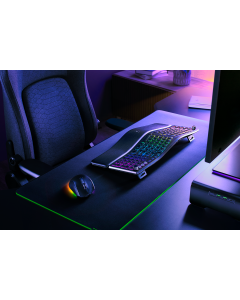
The Razer Pro Type Ergo is the kind of desk gadget that looks niche until you spend eight hours typing. A split ergonomic keyboard is not automatically better than a compact mechanical keyboard, but it solves a different problem: wrist angle, shoulder position, macro access and long-session comfort. The right comparison is not “which keyboard has the most features?” It is “which keyboard removes the friction you actually feel at the desk?”
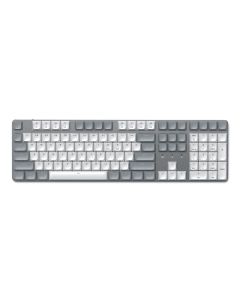
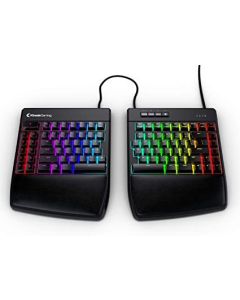
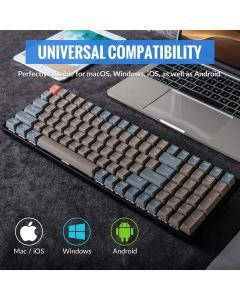
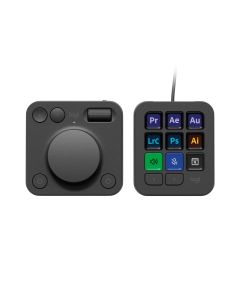
This guide compares Razer Pro Type Ergo with compact boards like the Satechi SM3 Slim Mechanical Keyboard, gaming/typing split boards like Kinesis Freestyle Edge RGB, travel-friendly boards like Keychron K4 V2, and workflow controllers like Logitech MX Creative Console.
Decision table
| Desk problem | Start with | Why | Limit |
|---|---|---|---|
| Wrists angle inward during long typing sessions | Razer Pro Type Ergo | Split layout and adjustable tilt target posture | Requires desk width and adaptation time. |
| You want compact wireless mechanical typing | Satechi SM3 Slim | Cleaner desk, lower footprint, familiar layout | Does not solve split-ergonomic posture. |
| You want split layout for gaming and typing | Kinesis Freestyle Edge RGB | Split board logic with gaming angle | More desk presence than compact boards. |
| You edit video/photos/audio and need shortcuts | Logitech MX Creative Console | Dedicated control surface for repeated actions | Not a keyboard replacement. |
What Razer publishes
Razer lists the Pro Type Ergo as a wireless split ergonomic full-size keyboard with scissor-switch membrane keys, integrated wrist rest, Razer Command Dial, five macro keys, Bluetooth, 2.4 GHz HyperSpeed wireless, USB-C, 19-zone RGB, 1,000 Hz polling, Windows/Mac compatibility and up to three months of battery life. Its support page lists approximate dimensions of 16.78 in by 7.49 in by 1.77 in and weight of about 2 lb.
The specs matter because this is not a minimal keyboard. It is a full desk object. If your desk is narrow, if you constantly move between locations, or if you prefer a tiny bag-friendly board, a compact keyboard may be a better fit.
When split ergonomic makes sense
Split ergonomic makes sense when your current keyboard pushes your shoulders inward or your wrists into an awkward angle. Adjustable tilt can help align the keyboard to your posture, especially with standing desks or different chair heights. The benefit is not instant magic; it is a more natural setup that may feel better over long repeated sessions.
When compact keyboards still win
Compact keyboards win when space, portability and simplicity matter more than posture correction. A compact board can free room for a mouse, notebook, drawing tablet or stream deck. For many people, reducing desk clutter solves more friction than adding a larger ergonomic device.
The “productivity” trap
Macro keys and dials only help if you assign them to actions you repeat every day. If you never configure software, a macro column becomes decoration. If your work really includes editing, spreadsheet shortcuts, audio controls or app switching, those extra controls can become useful. Be honest about whether you optimize tools or just buy them.
Pre-buy checklist
- Measure keyboard tray or desk width before choosing a full split board.
- Check whether your work machine allows Synapse or other configuration software.
- Decide whether wrist posture, compactness or shortcut control is the actual problem.
- Expect an adaptation period with any split keyboard.
- Keep return terms in mind; keyboard feel is personal.
FAQ
Is a split ergonomic keyboard better for everyone?
No. It can help certain desk setups and typing postures, but compact boards may be better for small desks and travel.
Is Razer Pro Type Ergo mechanical?
Razer lists scissor-switch membrane keys, not a traditional mechanical switch design.
Do macro keys matter for office work?
Only if you configure them for repeated tasks. Otherwise they add size without much value.
Should creators buy a keyboard or a control console first?
If typing is the pain, start with keyboard fit. If repeated editing controls are the pain, compare a controller like Logitech MX Creative Console.
The bottom line
Choose a split ergonomic keyboard when posture is the pain. Choose compact mechanical when space is the pain. Choose a creator controller when repetitive shortcuts are the pain. Don’t let RGB and macro keys distract from the actual desk problem.
Sources checked: Razer Pro Type Ergo official specs, Razer support specifications, Gadget Flow workspace trend listing.
As an Amazon Associate we earn from qualifying purchases.
Comments