
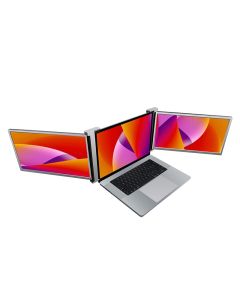
Short answer: a triple portable laptop monitor makes sense when you work from hotels, client sites, temporary desks, shared offices or travel setups and constantly miss a real multi-screen workstation. If your laptop mostly stays on one desk, a normal monitor is usually simpler, cheaper and more comfortable. If you only need occasional notes, chat or reference material, a tablet second display may be enough.
This is a buyer-intent guide, not a “more screens always wins” argument. Extra displays can improve a workflow, but they also add weight, cable friction, power needs and setup time. The right purchase depends on where you work, what you run on screen, and whether the extra display area solves a daily bottleneck or just looks impressive in a product photo.
Start with the work pattern
| Your real setup | Start with | Why it can work | What to verify first |
|---|---|---|---|
| You travel with a laptop but still need dashboards, docs, calls and research visible at once | Triple Portable Laptop Monitor | It recreates part of a fixed multi-monitor workstation in a portable format. | Laptop port support, power needs, folded size, total weight, desk depth and return policy. |
| You only need one larger extra surface for spreadsheets, coding, design review or reference pages | Single portable monitor | Less cable complexity and easier setup than a triple-screen frame. | Panel size, brightness, stand stability, USB-C video support and whether one cable can power/display. |
| You already own an iPad or tablet and need occasional side notes or chat | Tablet second display | Often cheaper because you already own the hardware. | App support, latency, battery, screen size and whether it behaves well with your laptop OS. |
| You work from the same desk most days | Full-size desk monitor | Better ergonomics, bigger panel options and cleaner cable permanence. | Desk space, arm mount, resolution, refresh rate, input ports and whether portability matters at all. |
When a triple portable monitor is not overkill
The triple-screen format earns attention when the buyer repeatedly loses time switching windows. Think remote consultants, analysts, developers, traders, creators, customer-support leads, ecommerce operators, project managers and students who move between places but still need a serious screen layout. A laptop alone can run the work, but it often forces everything through one cramped rectangle.
The useful advantage is context. One screen can hold the main document or code editor, another can hold research, notes or a dashboard, and the laptop display can keep calls, chat, email or task lists visible. That does not automatically make the product productive. It only matters if those views are genuinely used at the same time.
The hidden costs: cables, power and desk depth
Portable monitor listings often make setup look cleaner than reality. Before buying, verify exactly how the monitor connects to your laptop. Some laptops can drive multiple external displays through USB-C; others need DisplayLink, HDMI, extra drivers or external power. MacBook, Windows laptop, Chromebook and work-managed machines can behave differently, especially when company security policies limit drivers.
Desk depth matters too. A triple monitor frame can feel brilliant on a hotel desk that is wide enough and irritating on a café table or tiny meeting room surface. If the hinge or stand needs space behind the laptop, the real footprint can be larger than the product image suggests. Weight also matters: portable does not mean invisible in a bag.
When one portable screen is the smarter buy
If your main problem is “I need one more thing visible,” a single portable display is often the cleaner answer. It is easier to pack, easier to power and easier to set up quickly. It fits better for spreadsheet review, travel writing, coding with documentation open, photo culling, light gaming or a second screen during calls.
A single screen also creates fewer compatibility surprises. One extra display is well within the comfort zone of many laptops. Three extra panels push harder on ports, graphics support, power draw and desk ergonomics. If your work pattern is only occasional, the simpler product may create more real-world value.
Do not ignore comfort products around screen-heavy work
More screen time can also make fatigue more noticeable. That is why products such as the Smart Eye Massager and Intelligent Pulse Neck Massager belong near this setup, not because they magically fix work strain, but because screen-heavy routines often create end-of-day discomfort. Treat them as comfort tools, not medical devices.
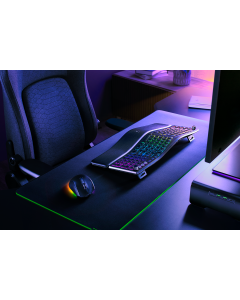
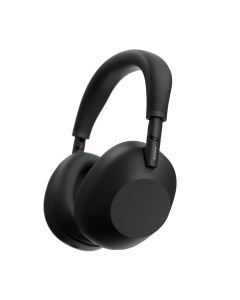
If you are building a full work setup, also compare the workstation basics: keyboard comfort, headphones, laptop height, lighting and cable management. A split ergonomic keyboard like the Razer Pro Type Ergo may be a better first upgrade if your pain point is typing posture, while noise-cancelling headphones such as the Sony WH-1000XM6 may matter more if your work happens in noisy places.
Pre-buy checklist
- Ports: confirm the exact laptop can drive the number of displays you expect.
- Power: check whether the screens need separate power or can run from the laptop.
- Drivers: verify whether DisplayLink or other software is required, especially on work machines.
- Weight: compare the total bag load, not just the screen size.
- Desk fit: measure real hotel, coworking or home desk depth.
- Return policy: buy only where you can return it if compatibility fails.
FAQ
Is a triple portable laptop monitor worth it?
It is worth considering if you travel or move between desks and regularly need several windows visible at once. It is less compelling if you mostly work from one fixed desk where a normal monitor is easier and cheaper.
Will every laptop support a triple portable monitor?
No. Multi-display support depends on ports, graphics hardware, operating system, drivers and sometimes company device restrictions. Verify the exact laptop and monitor requirements before buying.
Is a tablet a good second monitor?
It can be enough for notes, chat, documents or light reference work. It is usually less ideal for long spreadsheet, coding or design sessions where panel size, latency and ergonomics matter.
What is the biggest practical downside?
Setup friction. If the product takes too long to unfold, cable, power and position, it may stay in the bag. The best portable screen setup is the one you will actually use.
The sensible verdict
Buy the triple portable monitor if your laptop is your real workstation and you keep losing productivity to window switching while away from a permanent desk. Buy a single portable screen if you need one clean extra surface. Use a tablet if you already own one and the job is light. Choose a fixed monitor if portability is not the real problem.
Sources checked: Encalife triple portable monitor listing, Apple external display support guidance, Microsoft display connection guidance.
Some links on anagramshop may earn us a commission at no extra cost to you.


Comments