Encrypted USB Drive With a Keypad: When It Makes Sense for Travel, Offline Backups, and Sensitive Files
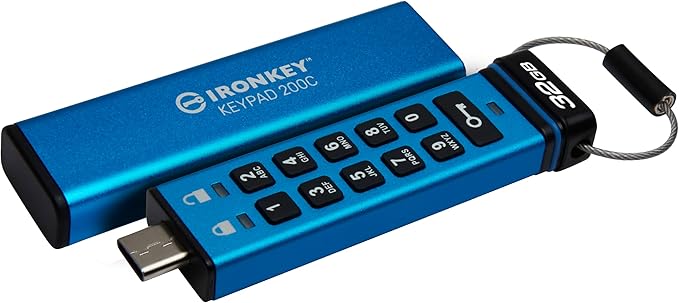
Editor angle: A practical buying guide for the Kingston IronKey Keypad 200, positioned around file security, portability, and workflows that do not depend on cloud convenience alone.
A hardware-encrypted drive is not for everyone, which is exactly why it can be sold cleanly when the use case is named properly. The buyer is not shopping for another thumb drive. They are solving for offline control, simpler sensitive-file handling, or travel-friendly security.
The IronKey Keypad 200 fits that lane well because the keypad makes the product easy to explain. The security story is physical, visible, and procedural instead of feeling buried in software menus.
Quick snapshot
| Best for | Travel, offline backups, and portable sensitive-file workflows. |
|---|---|
| Security focus | Hardware-encrypted removable storage |
| Setup style | Physical keypad access without cloud dependence |
| Why it matters | Adds friction where sensitive files should not stay casually exposed |
Featured product in this draft
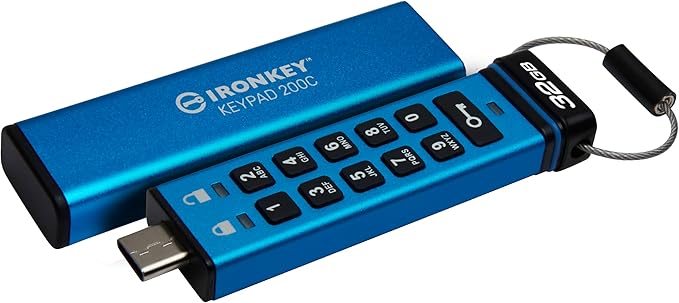
Kingston Ironkey Keypad 200
The KP200 offers military-grade security with FIPS 140-3 Level 3 (pending) certification, featuring XTS-AES 256-bit encryption and protection against Brute Force and BadUSB attacks. Its tamper-resistant design uses a tough epoxy to safeguard components. OS and device-independent, it unlocks via keypad without software, compatible with any USB Type-A or Type-C system. Users can set up Admin/User PINs for easy recovery, and Read-Only modes provide additional malware protection on untrusted systems.
Why this angle works
- Good fit for privacy, travel, and offline-backup content without sounding paranoid.
- Easy to explain visually because the keypad itself communicates the product’s purpose.
- Useful bridge between crypto/privacy readers and broader digital-security shoppers.
Who this is best for
- Readers carrying sensitive files between locations.
- People who want a more deliberate offline-backup workflow.
- Shoppers who prefer physical security habits over cloud-only convenience.
What to watch before you buy
- The post should focus on practical file habits, not spy-movie language.
- Avoid pretending this replaces every other backup practice; it is one layer in a stronger system.
- The strongest copy helps the buyer self-identify by workflow, not by fear.
This is not for everyone, and that is exactly why it is easy to position
A keypad-encrypted drive earns trust when the article clearly names who it is for. That could be the traveler carrying sensitive files, the buyer building a stronger offline-backup routine, or the person who simply wants one layer of protection that does not depend on software habits alone.
That clarity makes the recommendation feel sharper. The product is not trying to replace every storage workflow on earth. It is solving a narrower problem for readers who care about more deliberate file handling.
Why physical interaction changes the feel of the product
The keypad matters because it makes the value visible. Instead of selling hidden software complexity, the article can point to a simple ritual: enter the code, unlock the drive, use it for the files that deserve more care.
That tactile quality is part of the hook. It gives the piece a cleaner angle than generic encrypted-storage copy that never feels concrete.
Watch the related video
For the right workflow, the appeal is simple: more control and less casual exposure
This CTA should feel most direct when the reader already knows cloud convenience is not enough for the files they carry or store offline.
- Keep the pitch grounded in travel, offline backups, and sensitive-file handling.
- Avoid spy language and let the keypad plus workflow story do the persuasion.
Final take
For the right buyer, the value is simple: more control, less casual exposure, and a more intentional way to carry sensitive data.
Draft status: This post was generated as an internal draft and should be reviewed in admin before publishing.
Related Posts
Crypto Self-Custody Checklist for First-Time Hardware Wallet Buyers
Best Metal Seed Phrase Backup for Long-Term Crypto Storage Without Paper Fragility
Trezor Safe 3 First-Time Setup Guide for Buyers Leaving Hot Wallets Behind