
Make a tiny retro-style camera from cardstock, with a removable photo card that slides out of the top. This free beginner-friendly project is a decorative paper keepsake, not a camera that takes or prints photos. You can finish it with a small picture, drawing or handwritten message.
Free printable · A4 · 2 pages · 100% scale
Page 1 contains the camera cutouts, spacers and mini photo; page 2 illustrates the assembly. No purchase, signup or printer with photo-paper support is required.
Download the free A4 camera template (PDF)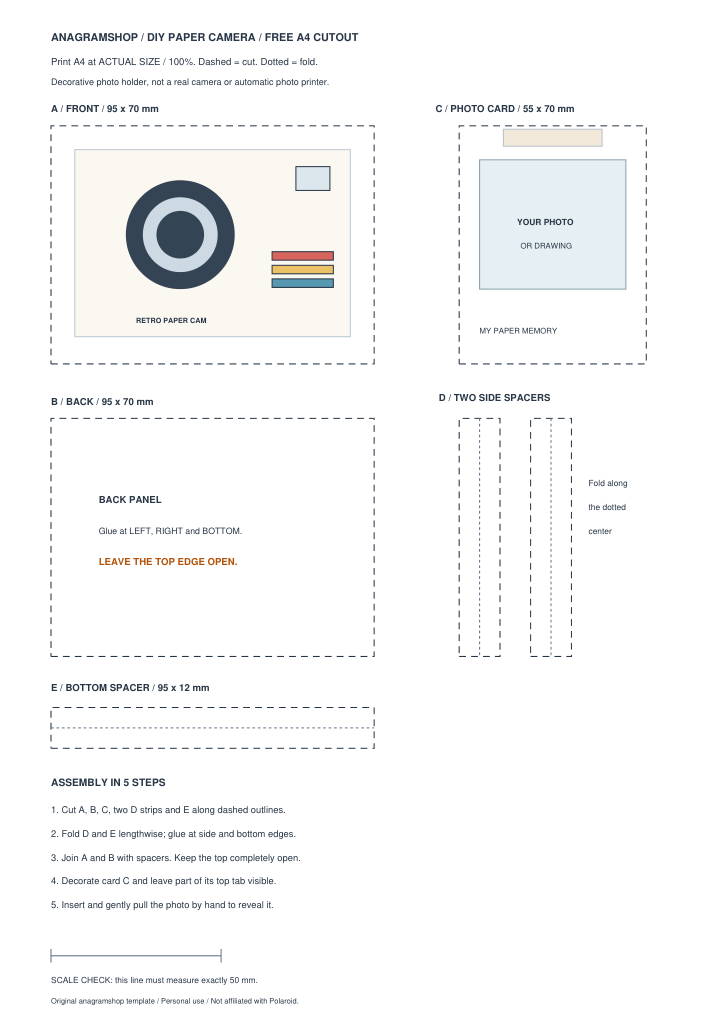
What you need
- Cardstock: one or two A4 sheets, around 180–250 gsm for a sturdier body.
- Tools: scissors, ruler, pencil and a glue stick or double-sided tape.
- Decoration: colored paper, markers or washi tape (optional).
- Memory: a small printed picture, drawing or handwritten note.
Start with supplies you already own. An instant camera, film pack, cutting machine and photo printer are not needed for this project.
How to make the paper camera
1. Print and cut the pieces
Print page 1 of the PDF on A4 at actual size (100%). Measure the 50 mm calibration line before cutting. Cut along the dashed outer outlines: front panel A (95 × 70 mm), back panel B (95 × 70 mm), sliding photo card C (55 × 70 mm), two side spacers D and bottom spacer E. The drawn lens and stripes are decorative; do not cut them out.
2. Fold the spacers
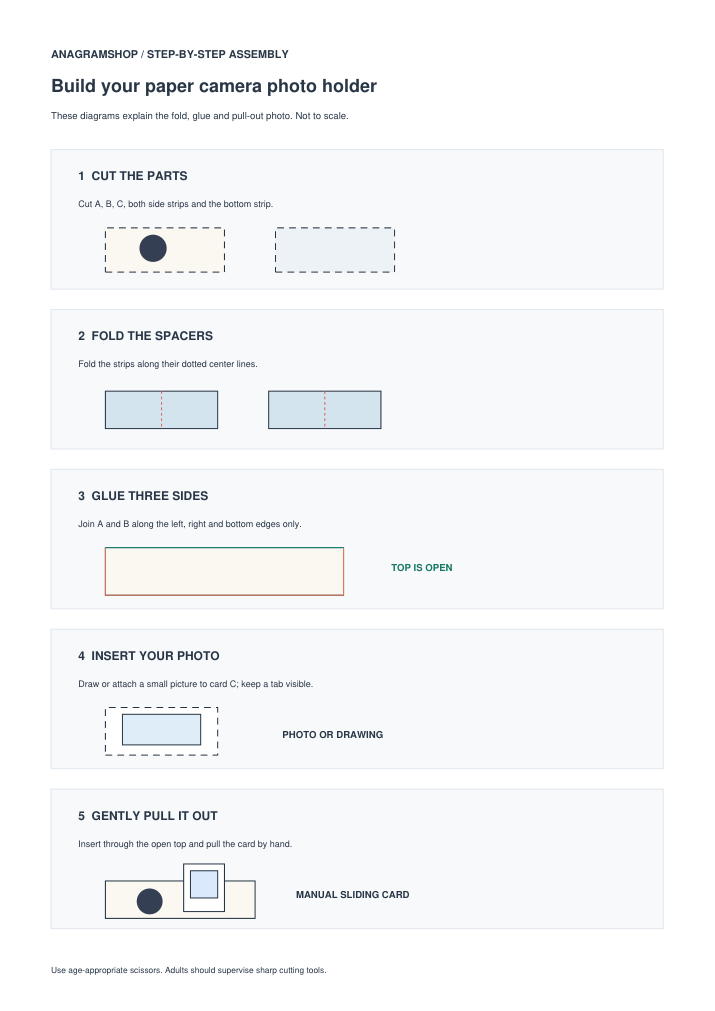
Fold each 12 mm-wide strip in half lengthwise along its dotted center line. These folded strips form the sides and base of a simple paper sleeve. Use a small amount of glue; extra adhesive inside the sleeve can catch the photo.
3. Join the front and back
Attach the folded strips along the left, right and bottom inside edges of the camera front. Align the back panel on top and press gently. Leave the entire upper edge open. Allow the glue to dry completely before inserting the card.
4. Create your pull-out photo
Use the printable photo card C. Glue on a small picture, draw something original or write a surprise message. Leave a little of the top edge visible as a pull tab when you insert the card. A handwritten note works just as well as a printed photo.
5. Slide out the photograph
Feed the card gently through the open top of the paper sleeve. Keep part of the card accessible, then pull it out by hand to reveal your memory. This is a simple manual slide, not an automatic photo-ejection mechanism.
Fix common problems
| Problem | What to try |
|---|---|
| Photo card gets stuck | Check that no glue leaked into the channel and that the panel edges are aligned. |
| Card disappears inside | Leave a visible pull tab; shorten the inserted portion slightly if necessary. |
| Body feels flimsy | Use heavier cardstock or reinforce the back panel. |
| Print is the wrong size | Select A4 and 100% / Actual Size; check the 50 mm reference line. |
Ideas for a personal paper-camera gift
Make a birthday surprise, a friendship keepsake, a tiny travel memory or a place card with a handwritten note. Try pastel card, a monochrome camera body or a rainbow stripe. For children, use age-appropriate scissors and adult supervision with sharp cutting tools.
Frequently asked questions
Does this paper camera really take Polaroid pictures?
No. It is a pretend retro-style paper camera with a photo card you move by hand. It contains no lens, sensor, printer or instant film.
Can I make it without a printer?
Yes. Draw two 95 × 70 mm panels and a photo card of approximately 55 × 70 mm, then make folded spacers for the left, right and bottom sides.
Is the template the same mechanism shown in the Pinterest video?
No. This is an original simplified anagramshop craft based on the general idea of a paper camera with a pull-out photograph, not a reconstruction of that video's exact prop or mechanism.
What should I buy for it?
If you already have cardstock, scissors and glue, nothing. We have not added unverified affiliate links or unrelated instant-camera offers.
Editorial note: This original paper pattern was prepared digitally; physical assembly has not yet been independently tested. It is not affiliated with or endorsed by Polaroid. There are currently no affiliate purchase links on this page.