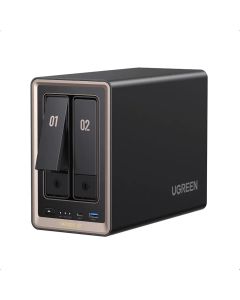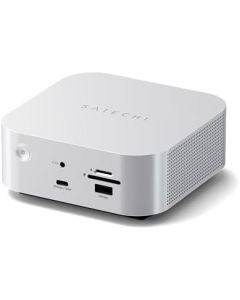
Short answer: buy a portable USB-C SSD when you need to carry project files between a laptop, camera setup and editing desk. Consider a UGREEN NASync DXP2800 GT when you need central storage on a network that several authorized computers can access. A Thunderbolt dock such as the Satechi CubeDock is a third category: it can simplify desk connections and accommodate directly attached storage, but it is not a multi-user NAS by itself.
These tools solve three different file problems. The right decision depends on travel, file size, who needs access, your existing network and what happens when a drive fails. We summarize published manufacturer specifications and practical trade-offs; this is not a hands-on speed test.
Portable SSD, NAS or Thunderbolt dock: side-by-side
| Question | Portable SSD | Two-bay NAS | Thunderbolt dock with storage |
|---|---|---|---|
| Where it lives | In your bag or plugged into one machine | At home, in an office or studio on a network | At a desk, connected to a compatible computer |
| Typical connection | USB-C or USB | Ethernet network | Thunderbolt connection to the host |
| Best for | Traveling photographers, editors, quick project handoffs | Multiple computers, central project library, scheduled backup workflows | Laptop-based desk that needs ports, displays and attached storage |
| What to check | Capacity, cable speed, ports, ruggedness and backups | Disks not included, RAID choice, router/switch, permissions and backups | Host Thunderbolt support, SSD type, thermals, display limits and accessories |
| Hidden cost | Second independent backup copy | Drives, network hardware, backup target, power consumption | Compatible SSD, suitable cable, power/port and laptop support |
When a portable SSD is the right first purchase
For a traveling creator shooting photos or video, a pocket-size SSD is the easiest starting point. Copy assets during travel, connect the drive when editing, and carry it back to the studio. No home router, NAS administrator account or switch is required. But one SSD is not a backup strategy. Keep a second protected copy of important files, especially before erasing camera cards.
Sandisk's 2026 portable SSD announcement distinguishes everyday Portable, higher-performance Extreme and Extreme PRO tiers. The current-generation Extreme family is advertised at up to 2,000 MB/s reads for suitable capacities, with performance depending on host support, workload and testing conditions. An advertised maximum read speed does not mean every laptop, USB-C cable or file transfer will achieve it. Before purchasing, verify the exact SKU and generation, because older Extreme products use similar names.
When the UGREEN NASync DXP2800 GT makes sense
The UGREEN NASync DXP2800 GT is a diskless, two-bay network storage enclosure. According to UGREEN's model specifications, it includes two SATA bays, two M.2 SSD slots, a 10GbE RJ45 port, an AMD Ryzen Embedded R2514 processor and 8 GB of DDR4 RAM. It uses UGOS Pro. That is a meaningful home-studio specification, but it is not an automatic productivity upgrade for everyone.
The hidden question is the network. If the NAS has a 10GbE port but your switch, computer adapter and cabling operate at 1GbE, the advertised faster interface cannot make the entire connection 10GbE. The installed drives, disk configuration and file workload will also affect actual speed. Before buying, price the drives you want, calculate usable capacity for your chosen RAID mode and check backup options and ongoing power use.
Some buyers assume a two-bay NAS is a “backup box”. It can be part of a backup strategy, but even mirrored disks are not a second independent backup. Deletion, ransomware, theft and fire can affect an entire system. Keep another copy that is independently protected.
When a Thunderbolt dock is better than a NAS
The Satechi Thunderbolt 5 CubeDock with NVMe SSD enclosure belongs at the computer desk. It is worth considering when your laptop needs a tidier connection to storage, displays and peripherals. Its value comes from combining a hub/dock workflow with optional SSD storage, not from acting as a remotely managed network storage server.
Check the exact host port and Thunderbolt generation before paying for a Thunderbolt 5 dock. USB-C connector shape alone proves nothing about link speed or display capabilities. If your laptop has a lower-spec port, you might pay for speed that the host cannot provide. Confirm SSD form factor, capacity limits, heat and monitor compatibility directly with the manufacturer.
A realistic workflow for a traveling creator
- Capture and first copy: back up camera cards to a portable SSD or directly to your laptop, verifying the files before erasing the card.
- Edit in the field: keep the working project small enough for your device and use a drive suited to the actual port speed.
- Return to the desk: use a dock only if it removes real cable and peripheral friction.
- Archive centrally: move completed projects to a protected NAS or other long-term storage, keeping another independent copy.
- Test recovery: a backup is only useful if you can restore the files you need.
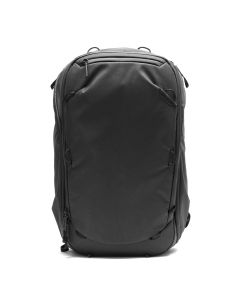
If you travel often, the Peak Design Travel Backpack 45L may be worth comparing as part of a complete mobile editing kit. Carrying cases and bags are separate buying decisions; they cannot solve missing backups.
Costs and seller checks before you buy
The NAS product page links to a specific new-item eBay offer from an independent US seller. Check the model name, shipping country, seller feedback, returns, voltage, included adapter and current stock. Diskless means your SATA drives are not included in the price. For a portable SSD, check manufacturer SKU, capacity, warranty and return policy; similar-looking drives may have different speeds and specifications.
Buying more terabytes is not always the best decision. A creator with a single laptop and occasional travel may obtain more value from two reliable portable SSDs and sensible backup habits than a costly multi-drive NAS. A creator managing shared editing assets across several machines may find the NAS worth the added setup work.
FAQ
Is 10GbE on a NAS faster than a portable SSD?
Not by itself. Actual performance depends on the computer, network equipment, drives, protocol and workload. The two systems also serve different purposes.
Does a diskless NAS include hard drives?
No. You must separately budget and install compatible storage media. Confirm drive compatibility and the usable capacity before checking out.
Does RAID replace an off-site backup?
No. RAID can provide redundancy for certain drive failures, but does not by itself protect against accidental deletion, compromised accounts, theft or fire.
Do I need Thunderbolt 5 to use an external SSD?
No. Portable SSDs support various USB connections. Thunderbolt 5 matters only when the device, host and workload can use its capabilities.
Our practical recommendation
Solo laptop and travel: start with a good portable SSD and a second independent backup copy. Multi-computer studio: compare the UGREEN NASync DXP2800 GT with total drive, backup and network costs. Desk connectivity pain: look at the Satechi CubeDock before building a whole NAS system. Buy what actually removes a bottleneck instead of buying the most expensive storage device first.
Disclosure: some anagramshop merchant links may generate a commission. Prices and inventory are seller-controlled. We have not independently benchmarked these devices.