
The Nest Hub Max is easy to buy for the wrong reason. The screen is bigger, the speaker is fuller, and the camera adds obvious utility, but that does not automatically make it the right smart display for every room.
This guide is for buyers who already like the idea of a Nest Hub Max and want to pressure-test that instinct before they order one. The goal is to figure out whether it fits the room and routine, not to drown the reader in a feature list they will forget five minutes later.
Quick snapshot
| Screen size | 10-inch touchscreen with ambient EQ |
|---|---|
| Camera | 6.5 MP wide-angle (used for Duo calls and face detection) |
| Best placement | Kitchen counters, family desks, and shared spaces with daily voice use |
| What matters most | Screen visibility, speaker clarity, camera usefulness, and room placement |
| Worth the upgrade when | You want a bigger shared display than a Nest Hub and actually use video calling or camera features |
| Common overbuy mistake | Treating it like a tiny TV instead of a shared-room utility screen |
Featured product
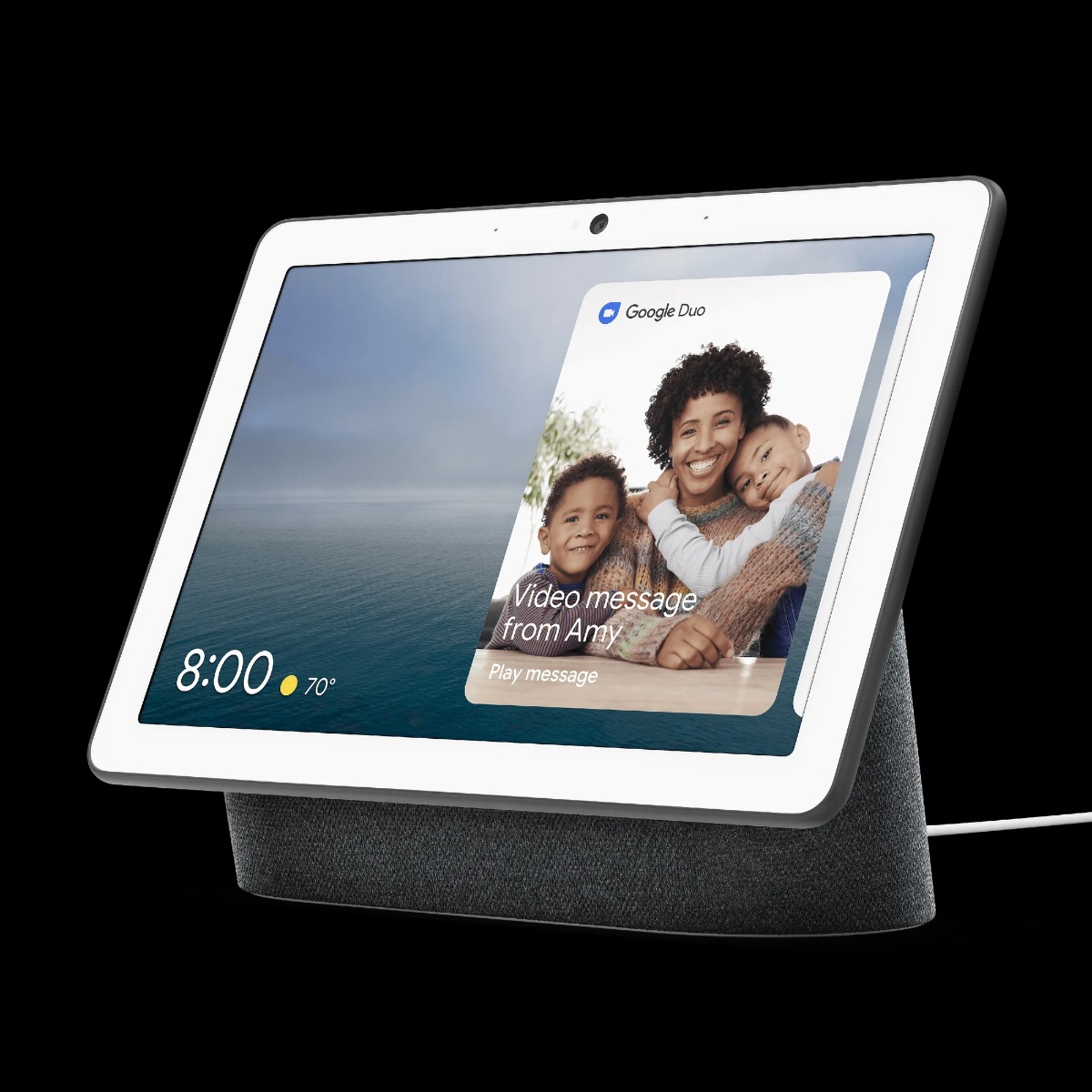
Google Nest Hub Max (2024 Edition)
The Nest Hub Max integrates advanced gesture controls, enhanced AI, and a more secure built-in camera to streamline your daily life. With gesture recognition, you can manage tasks hands-free, while the upgraded AI learns your routines to automate everything from lighting to reminders. The facial recognition feature boosts home security by notifying you of familiar or unfamiliar faces, making it an essential hub for your smart home. Google’s AI adapts to your preferences, delivering a personalized and efficient experience.
Why this angle works
- The bigger screen only pays off when the device lives in a room where more than one person actually glances at it.
- The camera is the dividing line: if you will never use video calling, gesture control, or room-aware features, the standard Nest Hub often makes more sense.
- Speaker quality is good enough for kitchens and shared spaces, but the product is strongest as a room utility, not a music-first smart speaker replacement.
- The best buying decision usually comes down to placement and routine, not raw specs.
Who this is best for
- Shared kitchens where timers, glanceable info, music, and camera checks all happen in the same space.
- Family desks or open-plan rooms where a larger screen is noticeably easier to use than a smaller Nest Hub.
- Buyers who will actually use the camera and want the bigger display to feel justified.
What to watch before you buy
- If the camera never matters to you, the Max can become an expensive way to buy extra screen size you do not really use.
- It is not a media-first screen. Buyers who want a bedside video player or a TV substitute usually expect the wrong thing.
- A smaller Nest Hub or a smart speaker often wins if the room does not really benefit from a bigger display.
The first question is not “is it good?” but “where does it live?”
Nest Hub Max makes the most sense in a kitchen, on a family desk, or in another shared space where more than one person benefits from the extra size. In those rooms the larger screen is not cosmetic. It makes timers easier to read, recipes easier to glance at, and camera interactions less awkward from across the room.
That is the useful buying lens. If the device is headed to a bedroom nightstand or a corner desk used by one person, the standard Nest Hub often does the same job with less cost and less physical footprint.
- Best fit: kitchens, family desks, and open shared rooms.
- Weak fit: private rooms where the larger screen adds bulk more than value.
- Camera-first buyers benefit more than buyers who only want passive ambient info.
The camera is the feature that decides whether Max is worth the jump
The simplest way to decide between Nest Hub and Nest Hub Max is to ask whether the camera changes the routine. For buyers who want video calling, gesture control, Nest Cam features, or a more “presence-aware” display, the Max earns its extra size and cost much more easily.
For everyone else, the upgrade can turn into pure overbuy. That does not make the Max bad. It just means the camera and bigger display need a real job in the room, not a hypothetical one.
Watch the related video
FAQ
When does Nest Hub Max make more sense than the regular Nest Hub?
When the display lives in a shared room and the camera actually matters. Kitchens, family desks, and open-plan spaces make the bigger screen and camera feel justified. If the device is mostly a personal clock, weather panel, or bedtime display, the regular Nest Hub is usually the cleaner buy.
What is the difference between Nest Hub and Nest Hub Max for buyers comparing screen sizes?
The standard Nest Hub (2nd gen) has a 7-inch screen and no camera. The Nest Hub Max has a 10-inch screen and a wide-angle camera. For kitchens, shared rooms, and camera-aware use cases, Max earns the premium. For quieter personal placements, the smaller Nest Hub often feels smarter rather than smaller.
Can Nest Hub Max work as a basic indoor camera?
Yes. The built-in camera supports Nest Cam functionality inside the Google Home app, which makes it more useful in shared spaces than a camera-less display. If that feature matters to you, Max becomes easier to justify.
Is Nest Hub Max a good bedroom device?
Usually no. The larger footprint and camera make it feel better suited to kitchens, offices, and shared counters. A standard Nest Hub is usually the better bedroom pick.
Final take
Nest Hub Max is a good product when it lives in the kind of room that lets the bigger screen and camera do real work. That is the buying question worth answering before you order.
Choose the room before you choose the screen
The best Nest Hub Max purchase happens when the room clearly wants a bigger display and a camera. If that answer is fuzzy, the smaller Nest Hub is often the smarter buy.
- Kitchen or family desk: strong case for Max.
- Bedroom or single-user side table: check whether the regular Nest Hub is the better fit first.
Comments